What Features Does an Implant Dental Unit Need in 2026?

Time:2026-11-01 Author:Amelia
0%

In 2026, an implant dental unit must support precise, repeatable work—not just look advanced. Clinicians need a stable patient chair, clear operating light, accessible controls, and a surgical motor with adjustable speed and torque. Reliable irrigation matters, too. A dry field can change quickly during drilling. So can the clinician’s posture.

The World Health Organization’s Global Oral Health Status Report (2022) estimates that oral diseases affect nearly 3.5 billion people worldwide. This figure describes broad oral disease, not implant treatment demand. Still, it highlights the scale of care dental teams provide. ITI consensus guidance also stresses careful planning and appropriate implant treatment protocols. The equipment should make those protocols practical, while allowing clinicians to maintain visibility and workflow control.

What features are needed for a specialized implant dental unit? Look for integrated surgical-motor controls, dependable irrigation, adjustable positioning, and surfaces that are straightforward to clean. Consider compatibility with imaging and other practice systems, but verify it with the manufacturer. “Integrated” does not always mean effortless. Ask how components are serviced, how settings are checked, and whether staff can reach controls without interrupting sterile workflow. A unit can be impressive in a showroom yet awkward during a long procedure. There is no universal configuration. The right choice depends on treatment scope, room layout, and the team’s habits. That deserves honest evaluation.
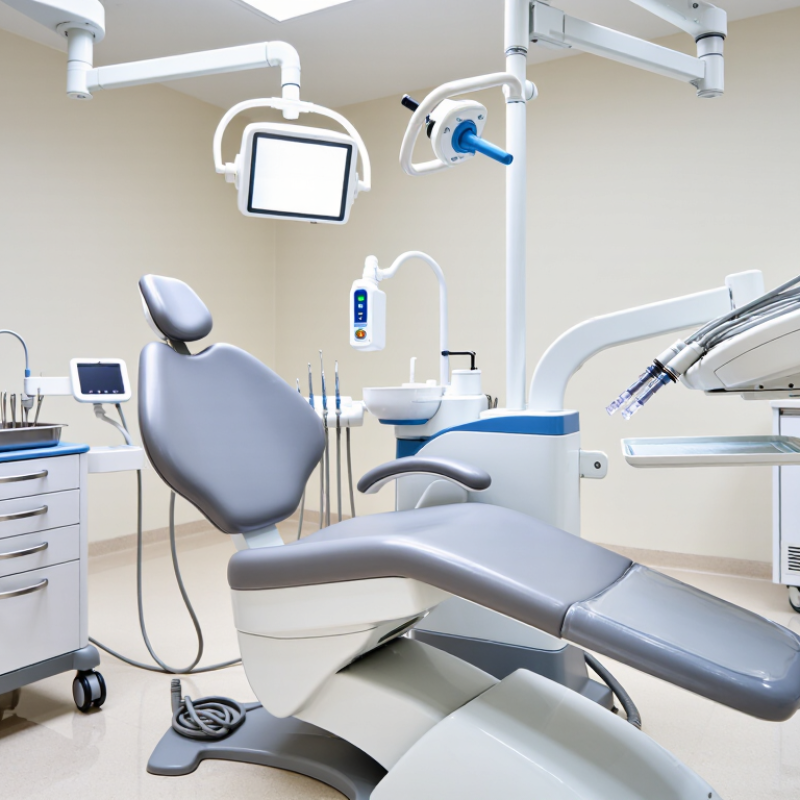
What Features Does an Implant Dental Unit Need in 2026?

What an Implant Dental Unit Is and How It Supports Surgery

An implant dental unit is a surgical setup built around a motor that drives the implant handpiece at controlled speed and torque. It is more specialized than a general dental chair unit. The system may include a control console, foot pedal, irrigation pump, handpiece, and chairside display. Together, these parts help the clinician prepare the implant site with measured movement and cooling.

During surgery, the foot pedal lets the clinician adjust or stop the motor without reaching across the sterile field. A peristaltic pump delivers sterile irrigation through tubing toward the drilling area, helping carry away heat and debris. The display shows settings such as speed and torque, while the motor transfers power to the handpiece.

Small details matter. Tubing should be routed without pulling, and controls should remain easy to read under operating lights.

A reliable unit supports a consistent workflow, but it cannot replace clinical judgment or training. The correct settings depend on the implant system, site, bone conditions, and the clinician’s protocol. Staff should check the motor, irrigation flow, and pedal response before the procedure.

A polished screen is not enough. I would also consider how quickly the team can identify a blocked line or change a setting with gloved hands; that practical test is easy to overlook.

Essential Chair, Delivery, and Instrument Systems

An implant dental unit should support steady positioning and clear access throughout a procedure. The chair needs a stable base, smooth adjustments, and a headrest that lets the clinician position the patient without straining. During placement, even small shifts can disrupt visibility. A narrow base may leave more room for the team, but it should not make the chair feel unstable. Small details matter. Check that the foot control is easy to reach and that the chair moves predictably between working positions.

The delivery system should keep the motor, irrigation, and handpieces within comfortable reach without crossing the assistant’s working area. Controls should be distinct and usable with gloved hands; confusing settings can slow a procedure. Instrument lines need enough length for normal movement, but excess tubing can snag or clutter the floor. Instrument selection depends on the clinician’s workflow, so confirm compatibility with the intended implant motor and handpieces. Ask how components are cleaned, maintained, and replaced. No layout suits everyone. A compact design can save space, yet crowd access to the patient. Test the chair and delivery setup in realistic working positions before choosing.

Imaging, Lighting, and Visibility Features for Implant Procedures

What Features Does an Implant Dental Unit Need in 2026?

During implant procedures, the operator needs clear views of both the surgical site and planning images. A well-positioned display can show CBCT slices or digital radiographs without forcing the clinician to repeatedly turn away. The unit should support a practical imaging workflow, including accessible sensor connections and a monitor that can be adjusted for viewing angle and height. Small details matter.

Lighting needs to reveal tissue color and depth while limiting glare from instruments and wet surfaces. An adjustable lamp with a stable, focused beam helps keep the site visible as the clinician changes position. Shadows still happen. Handle design and lamp positioning should make quick adjustments possible without interrupting the procedure. Brightness alone is not a visibility strategy.

A 2018 systematic review in Clinical Oral Implants Research reported mean deviations of about 1.2 mm at implant entry points and 1.4 mm at implant tips for static computer-guided surgery. Those figures underline why clear planning images and an unobstructed view matter; equipment cannot remove every source of placement error. It is also worth questioning whether a large screen is truly useful if glare, poor positioning, or clutter makes details hard to read. Combine readable displays, controllable lighting, and an uncluttered field, then assess visibility from the clinician’s actual working position.

What Features Does an Implant Dental Unit Need in 2026? — Imaging, Lighting, and Visibility Features for Implant Procedures
Feature Practical specification or capability Why it matters for implant procedures What to verify before selection
Operating-light illuminance Adjustable output; commonly about 8,000–40,000 lux for dental operating lights. Check the stated measurement distance and light-field dimensions. Provides enough illumination to distinguish tissue, bone, instruments, and the surgical site without relying on room lighting alone. Confirm that intensity is adjustable at the intended working distance and that the light field suits the clinical working area.
Light color and rendering A dental operating light may offer a correlated color temperature in the approximate 3,500–6,000 K range. A high color-rendering index, such as Ra 90 or higher, is a useful selection target where accurate tissue-color perception is important. Consistent, natural-looking color helps clinicians assess soft tissue and maintain visibility during detailed work. Review the manufacturer’s color-temperature and color-rendering data; assess color appearance in the actual operatory.
Shadow control and light positioning Use a multi-source or shadow-reducing light design with a freely positionable head and stable articulating arm. Hands, instruments, and the clinician’s head can block a single direct beam during implant placement. Test positioning from common surgical approaches. Check that the light remains stable and can be repositioned without interrupting the procedure.
Intraoral X-ray compatibility Provide a compatible intraoral X-ray system and digital sensor workflow, or clearly documented connections for compatible equipment. Sensor active area and stated resolution vary by model. Periapical images can support assessment of teeth and surrounding structures before and after treatment; they do not replace three-dimensional assessment when indicated. Check sensor compatibility, image transfer to the practice software, positioning options, and the applicable local radiation-safety requirements.
CBCT access and workflow Where clinically indicated, support access to cone-beam computed tomography (CBCT), either through an integrated system or a compatible external imaging workflow. Selectable fields of view and voxel sizes vary by scanner; values around 75–400 μm are commonly available across systems. CBCT can provide three-dimensional information for evaluating anatomy and planning implant placement when justified by the clinical case. Choose field of view and resolution according to the diagnostic task. Confirm image-export compatibility and follow radiation-protection guidance; CBCT is not required for every implant case.
Image display and viewing position Provide a securely mounted, easily adjustable display with adequate resolution for the intended task. Diagnostic interpretation should use a display and viewing setup appropriate to the imaging workflow. A well-positioned image helps the clinician review radiographs or planning images without repeatedly turning away from the patient. Check screen articulation, viewing angle, glare control, cleaning requirements, and whether the display is intended for diagnostic interpretation or general image review.
Magnification and line of sight Allow practical use of clinician loupes or a microscope, with clear access around the operating light and patient chair. Magnification can improve visibility of fine structures and surgical details, while unobstructed sightlines help maintain a stable working posture. Test the complete setup with the clinician’s usual magnification and head position; check for clashes between the light, microscope, monitor, and assistant’s workspace.
Assistant visibility and access Provide space and clear sightlines for the assistant, suction, irrigation, and instruments without blocking the operative light. Good four-handed access supports efficient instrument transfer and management of fluids during surgery. Assess the unit with the patient chair, delivery system, assistant’s position, and commonly used surgical instruments in place.
Cleanability and light controls Use accessible controls and surfaces that can be cleaned and disinfected according to the manufacturer’s instructions; non-contact or handle-operated light controls can reduce contact with the light head. Convenient controls help maintain illumination settings while supporting routine infection-prevention practices. Confirm approved cleaning agents, removable or autoclavable handles if provided, and easy access to intensity and operating modes.

Selection note: Specifications vary by model and jurisdiction. Confirm current technical documentation, clinical indications, and applicable radiation-safety requirements before purchase or use.

Infection Control, Safety, and Workflow Integration

An implant dental unit needs infection controls that work during a busy procedure, not just on a specification sheet. The WHO’s 2022 Global Report on Infection Prevention and Control estimates that strong infection-prevention measures can prevent up to 70% of healthcare-associated infections. That figure covers healthcare broadly, not implant dentistry alone. Still, it underlines why cleanable surfaces, accessible handpiece connections, and clear separation of clean and contaminated zones matter. The CDC’s dental infection-control guidance calls for treatment water to meet the drinking-water standard of no more than 500 CFU/mL. Waterline treatment and routine monitoring should therefore be practical to perform and document. Small details matter. A sensor tucked behind a bracket may be easy to overlook.

Safety and workflow integration are equally practical concerns. Look for accessible emergency stops, stable chair positioning, and controls that reduce unnecessary reaching across the sterile field. Integrations with imaging, suction, and clinical records should support the team’s sequence of work, rather than add extra screens or cables near the operator. Test the layout with real trays, gloves, and staff positions before purchase. Even a well-designed room has compromises; a cable can still cross a clean zone when equipment is rearranged. The right unit makes routine checks visible and keeps the next safe step easy to follow.

Choosing a Unit for Current and Emerging Clinical Needs

What Features Does an Implant Dental Unit Need in 2026?

Choosing a Unit for Current and Emerging Clinical Needs

An implant dental unit should support steady, controlled work throughout a procedure. Look for a stable chair, flexible positioning, and clear access to the surgical field. These details matter when the clinician needs to adjust posture without interrupting treatment. A micromotor with adjustable speed and torque can help match settings to the procedure. Reliable irrigation and effective suction also help maintain visibility. Small controls should be easy to reach while wearing gloves.

Clinical needs keep changing. A unit should fit existing imaging, instruments, and room workflows, with practical options for future upgrades. Check how cables, foot controls, and handpieces are arranged; crowded spaces can slow a team down. Ask about cleaning access, compatible components, maintenance intervals, and local service support. Specifications alone do not show how a unit feels during a long appointment. No feature list predicts every awkward reach, either. A hands-on demonstration can reveal issues that brochures miss.

Tips: Test chair movement with your usual setup. Confirm that controls are easy to identify, irrigation is adjustable, and routine cleaning does not require awkward access. Then ask staff what feels inconvenient.

FAQS

What should an implant dental unit provide for viewing images?

It should display CBCT slices or digital radiographs within the clinician’s normal line of sight. Adjustable height and angle help reduce repeated turning.

What makes a dental light useful during implant procedures?

A stable, focused beam can reveal tissue color and depth. Quick handle adjustments help when the clinician changes position. Shadows still happen.

Does brighter lighting always improve visibility?

No. Glare from wet surfaces or metal instruments can hide details. Check the light from the actual working position.

How important is monitor placement?

A large screen may not help if it sits at a poor angle or adds clutter. Readability matters more than size alone.

Can equipment eliminate implant placement errors?

No. One 2018 review reported mean deviations of about 1.2 mm at entry points and 1.4 mm at implant tips for static computer-guided surgery. Clear views help, but they cannot remove every error source.

Which movement and control features should clinicians test?

Check chair stability, positioning, and access to the surgical field. Controls should be easy to reach with gloves on. Test them with your usual setup.

Why are irrigation and suction important?

Adjustable irrigation and effective suction can help maintain visibility. Their controls should be reachable without interrupting the procedure.

What should a clinic check before choosing a unit?

Confirm compatibility with existing imaging and instruments, plus cleaning access, maintenance intervals, and local service support. Ask staff what feels awkward; brochures may miss it.

Conclusion

A specialized implant dental unit is designed to support precise, efficient care throughout implant procedures, from patient positioning and surgical preparation to instrument access and recovery. What features are needed for a specialized implant dental unit? Key essentials include a stable, adjustable chair, an ergonomic delivery system, and reliable access to the instruments used during surgery. Clear imaging, focused adjustable lighting, and an unobstructed view of the treatment area can help clinicians assess the site and work with greater accuracy.

Effective infection-control features, accessible safety controls, and well-organized equipment can make clinical workflows more consistent and help reduce unnecessary interruptions. Integration with imaging and other clinical systems may also support planning and documentation. When choosing a unit, practices should consider their current procedures, available space, staff workflows, maintenance needs, and potential future requirements. A thoughtful selection balances surgical visibility, comfort, usability, and flexibility rather than focusing on a single feature.

Amelia

Amelia

Amelia is a seasoned marketing professional with a wealth of expertise in our company’s core offerings. With an unwavering passion for driving growth and innovation, she plays a pivotal role in shaping our marketing strategies and enhancing brand visibility. A key aspect of her responsibilities......